X11
Prerequisite
- Have working terminal set up.
X-11 is a protocol for rendering graphical user interfaces (GUIs) that can be sent along an SSH tunnel. If you plan on using a GUI on a Mahuika you will need to have an X-Server and X-Forwarding set up.
X-Servers
You must have a X-server running on your local machine in order for a GUI to be rendered.
Instructions or download links for X-servers can be found below.
| Operating System | Download |
|---|---|
| Windows | WSL2 or MobaXterm |
| MacOS | Xquartz |
| Linux | Xorg or Wayland (using XWayland) are available through your Linux distro |
X-Forwarding
Finally your ssh tunnel must be set up to 'forward' along X-11 connections.
OpenSSH (terminal)
Make sure the -Y or -X flag is included
ssh -Y user@lander.nesi.org.nz
ssh -Y login.nesi.org.nz
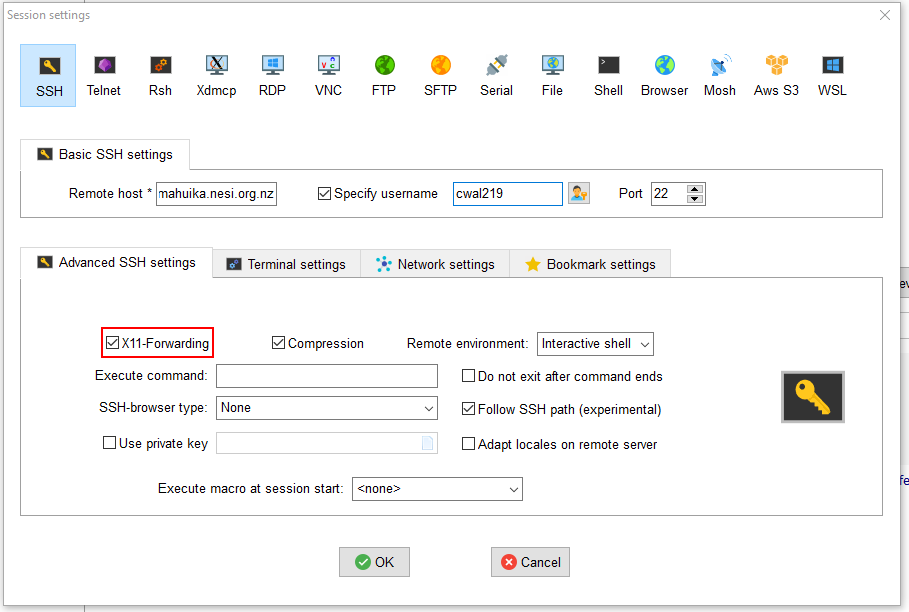
MobaXterm
Under 'session settings' for your connection make sure the X-11 forwarding box is checked.
X-Forwarding with tmux
X11 programs find out how to reach your local machine's X11 Server by reading the DISPLAY environment variable set by ssh, so before launching one from inside a preexisting tmux session you first need to update the value of DISPLAY to match the current login environment from which you reattached. That can be done with the command:
eval $(tmux showenv -s DISPLAY)
Interactive Slurm jobs
In order to make use of X11 in an interactive Slurm job:
srun
Add the flag --x11
srun --ntasks 36 --mem-per-cpu 1500 --time 01:00:00 --x11 --pty bash
salloc
add the flag -Y when ssh-ing to the node.
ssh -Y wbn001
Headless display using XVFB
If your application requires X11 in order to run, but does not need to
be interactive you can use X11 Virtual Frame Buffer. This may be
required to in order to run visual applications on the compute nodes.
Prepending any command with xfvb-run will provide a dummy X11 server
for the application to render to.
e.g.
xvfb-run myapp -t 4 data.in data.out