Parallel
30 Minutes
Objectives
- Prepare a job submission script for the parallel executable.
Prerequisite
How to use multiple CPUs
Requesting extra resources through Slurm only means that more resources will be available, it does not guarantee your program will be able to make use of them.
Generally speaking, parallelism is either implicit where the software figures out everything behind the scenes, or explicit where the software requires extra direction from the user.
Scientific software
The first step when looking to run particular software should always be to read the documentation. On one end of the scale, some software may claim to make use of multiple cores implicitly, but this should be verified as the methods used to determine available resources are not guaranteed to work.
Some software will require you to specify the number of cores, or even the type of parallelisation.
For example, ANSYS uses -np 16 to set the number of cores, and -dis to choose distributed memory parallelism.
Occasionally your input files may require rewriting/regenerating for every new CPU combination (e.g. domain based parallelism without automatic partitioning).
Writing code
Occasionally requesting more CPUs in your Slurm job is all that is required and whatever program you are running will automagically take advantage of the additional resources. However, it's more likely to require some amount of effort on your behalf.
It is important to determine this before you start requesting more resources through Slurm.
If you are writing your own code, some programming languages will have functions that can make use of multiple CPUs without requiring you to change your code. However, unless that function is where the majority of time is spent, this is unlikely to give you the performance you are looking for.
Python: Multiprocessing (not to be confused with threading, which in standard Python does not run Python code in parallel.)
MATLAB: parpool
Types of parallelism
To understand the different types of Parallel Computing we first need to clarify some terms.
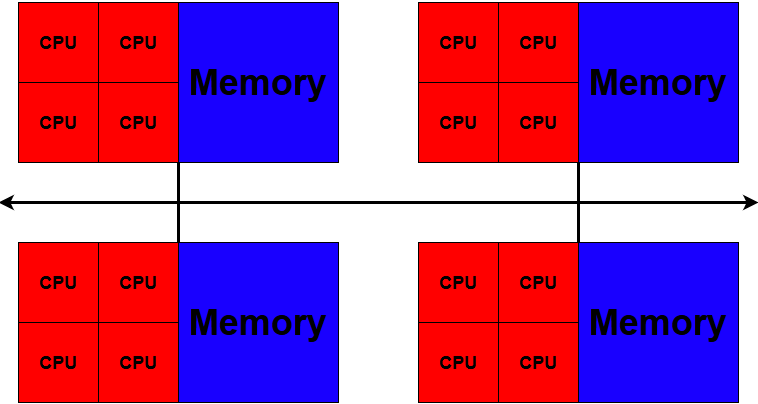
CPU: Unit that does the computations.
Task: One or more CPUs that share memory.
Node: The physical hardware. The upper limit on how many CPUs can be in a task.
Shared Memory: When multiple CPUs are used within a single task.
Distributed Memory: When multiple tasks are used.
Which methods are available to you is largely dependent on the nature of the problem and software being used.
Shared memory (SMP)
Shared-memory multiprocessing divides work among CPUs or threads, all of these threads require access to the same memory.
Often called Multithreading.
This means that all CPUs must be on the same node. Most Mahuika compute nodes have 128 or 168 cores (see Hardware).
Shared memory parallelism is used in our example script sum_matrix.r.
Number of threads to use is specified by the Slurm option --cpus-per-task.
Distributed memory (MPI)
Distributed-memory multiprocessing divides work among tasks, a task may contain multiple CPUs (provided they all share memory, as discussed previously).
Message Passing Interface (MPI) is a communication standard for distributed-memory multiprocessing. While there are other standards, often 'MPI' is used synonymously with distributed parallelism.
Each task has its own exclusive memory, and tasks can be spread across multiple nodes, communicating via an interconnect. This allows MPI jobs to be much larger than shared memory jobs. It also means that memory requirements are more likely to increase proportionally with CPUs.
Distributed-Memory multiprocessing predates shared-memory multiprocessing, and is more common with classical high performance applications (older computers had one CPU per node).
Number of tasks to use is specified by the Slurm option --ntasks, because the number of tasks ending up on one node is variable you should use --mem-per-cpu rather than --mem to ensure each task has enough.
Using a combination of Shared and Distributed memory is called Hybrid Parallel.
GPUs
A GPU computes large numbers of simple operations in parallel, making it well suited for Graphics Processing (hence the name), or any other large matrix operations.
On Mahuika, GPUs are specialised pieces of hardware that you request in addition to your CPUs and memory.
You can find a list of the GPUs available on Mahuika on the Hardware page.
GPUs can be requested using --gpus-per-node=TYPE:NUMBER, for example --gpus-per-node=a100:1 for one A100 GPU.
See Using GPUs for the GPU types and how to request each one.
GPU job example
Create a new script called gpu-job.sl
#!/bin/bash -e

#SBATCH --job-name        gpu-job
#SBATCH --account         nesi99991
#SBATCH --time            00:01:00
#SBATCH --output          %x.out
#SBATCH --mem-per-cpu     2G
#SBATCH --gpus-per-node   a100:1

module purge
module load CUDA
nvidia-smi
Solo learners
Replace nesi99991 in the --account line with your project code.
then submit with
sbatch gpu-job.sl
Check the output
Once the job has finished, check gpu-job.out.
Which GPU did your job get?
Job arrays
Unlike the previous two methods, job arrays are not "multiprocessing". Job arrays are ideal for embarrassingly parallel problems, where there are little to no dependencies between the different jobs.
Arrays can be thought of less as running a single job in parallel and more about running multiple serial jobs simultaneously. Often this will involve running the same process on multiple inputs.
Embarrassingly parallel jobs should be able to scale without any loss of efficiency. If this type of parallelisation is an option, it will almost certainly be the best choice.
A job array can be specified using --array
If you are writing your own code, then this is something you will probably have to specify yourself.
Comparing the methods
| Name | Other Names | Slurm Option | Pros | Cons |
|---|---|---|---|---|
| Shared Memory Parallelism | Multithreading, Multiprocessing | --cpus-per-task |
All CPUs share the same memory, so no data has to be sent between them. | Limited to the CPUs and memory of a single node. |
| Distributed Memory Parallelism | MPI, OpenMPI | --ntasks and add srun before command |
Tasks can be spread across many nodes, so jobs can be much larger. | Software must be written to use MPI. Time is spent sending data between tasks, and memory use grows with the number of tasks. |
| Hybrid | --ntasks and --cpus-per-task and add srun before command |
Can use many nodes, with fewer tasks to communicate between than MPI alone. | The hardest to set up, the best mix of tasks and CPUs per task has to be found by testing. | |
| Job Array | --array |
Scales with almost no loss of efficiency. Each job is small, so it schedules sooner. | Must be 'embarrasingly parallel' | |
| General Purpose GPU | --gpus-per-node |
Fast for large numbers of simple operations, such as matrix operations. | Software must be written to use GPUs |
Keypoints
- Parallel programming allows applications to take advantage of parallel hardware; serial code will not 'just work.'
- There are multiple ways you can run processes in parallel
What Next